Invoice template: make an invoice for free in your browser, Excel or Word
An invoice template is a ready-made invoice layout where you fill in your own details and the invoice lines. Make an invoice right away with the form below and save it as a PDF, or download the same template in Excel or Word. No sign-up is needed, and nothing you type in the form is sent to a server. The template has all the details required by the Finnish VAT Act, and the form and the Excel version calculate the line totals, VAT by rate and the amount due for you.
Free, no sign-up. A standard .xlsx or .docx file.
The template itself is in Finnish, as used in Finland.
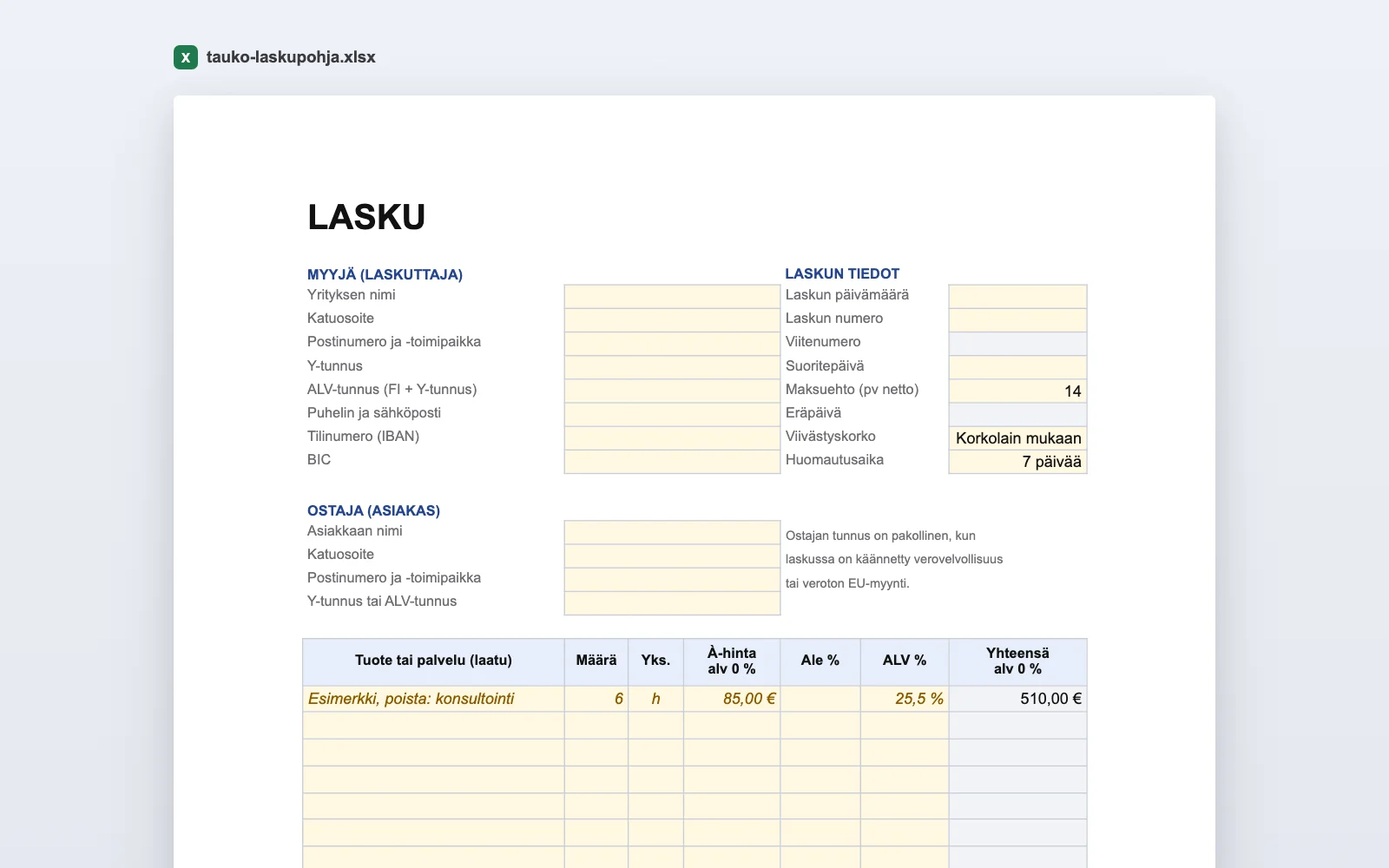
What's in the template
- All mandatory invoice details: date, sequential number, Business ID and VAT number, buyer details, date of supply and VAT by rate
- Invoice lines with quantity, unit, unit price excl. VAT, discount and a VAT rate from a list (25.5%, 13.5%, 10% or 0%)
- VAT breakdown that calculates the amount excl. VAT, the VAT and the amount incl. VAT separately for each rate
- Reference number calculated from the invoice number, and a due date calculated from the payment terms
- A warning if a line has no VAT rate
- A Word version with the same structure, if you want to write the totals yourself
- A ready A4 print area: one command produces the PDF
How to use the template
- 1Fill in your own details once
Type your company name, address, Business ID, VAT number and account number in the yellow cells. Save the file as your own template so you don't have to type the details again.
- 2Give the invoice a number and a date
Number your invoices sequentially without gaps, for example 1001, 1002 and so on. The template calculates the reference number and due date for you.
- 3Add the buyer's details
Name and address are always required. The buyer's Business ID or VAT number is needed when the invoice uses the reverse charge or is a VAT-exempt EU sale.
- 4Write the invoice lines
Delete the sample line. Enter the product or service, quantity and price excl. VAT, and pick the VAT rate from the list. The totals and VAT breakdown update automatically.
- 5Save as PDF and send
The print area already fits on one A4 page. Keep the invoice you sent as a PDF, because it is the document for your bookkeeping.
What must an invoice include?
Section 209 e of the Finnish VAT Act lists the mandatory details on an invoice. The most important are the invoice date, a sequential number, the seller's VAT number, the names and addresses of the seller and the buyer, the quantity and type of goods or services, the date of supply, the unit price excl. VAT, the VAT rate and the amount of VAT by rate. The template has a field for each, so nothing gets left out by accident.
The date of supply is the day the goods were delivered or the service was performed. It can differ from the invoice date, and it decides which month's VAT return the sale belongs to. If you invoice a whole month's work at once, the last day of the month works as the date of supply.
If you are not liable for VAT because your turnover stays under €20,000 in a calendar year, don't put a VAT rate or VAT amount on the lines. Leave the VAT column empty and write in the additional information "Myyjä ei ole arvonlisäverovelvollinen (AVL 3 §)" (the seller is not liable for VAT, section 3 of the VAT Act). Read more about the mandatory details on an invoice.
How do I make an invoice myself for free?
A self-made invoice takes five minutes. Download the invoice template, enter your details, the buyer's details and the invoice lines, check the total and save it as a PDF. Send the PDF by email or print it. The law doesn't require invoicing software, as long as the invoice has the mandatory details and invoices are numbered sequentially.
Before your first invoice you need a Business ID, a bank account and a decision on payment terms. If the price is agreed first, send a quote with the quote template. If you invoice companies regularly, ask whether they want an e-invoice, because then a PDF won't do. Keep the invoice numbers in one place, for example in this template, so the same number isn't used twice. If the customer pays on paper, the account number and reference number go on a bank transfer form.
Example: a graphic designer makes a logo for €400 and is in the VAT register. The invoice gets one line: €400.00 excl. VAT, VAT 25.5% or €102.00, and €502.00 due. It also includes the date of supply, a due date 14 days later and a reference number. If the designer is not in the VAT register, €400.00 is due and the additional information says the seller is not liable for VAT.
Invoice layout template: Excel, Word or a filled-in example?
An invoice layout template is a ready invoice frame. The fields are in place, and you only fill in your own details, the buyer and the invoice lines. This page gives you the same template as two files. Excel calculates the totals, VAT and reference number for you. Word suits you if you want to edit the layout freely and calculate the totals by hand.
If you'd like to see a finished invoice in different situations first, look at the filled-in examples in the article invoice example. The shortest legally valid model is in the article simple invoice. Choose a template with a field for every mandatory detail and where the invoice numbers stay sequential when you make the next invoice from the same template.
Is a simple or free-form invoice enough?
An invoice can be free-form. The law doesn't dictate the font, the layout or the software, but it does dictate the content. When the invoice total is €400 or less, a simplified invoice with fewer details than a full invoice is enough. A shop's till receipt is often exactly that. When the customer pays straight away, make a receipt with the receipt template.
A simplified invoice can't be used for EU sales of goods, distance sales or the reverse charge; these always need the full details. Making a full invoice with the template is just as quick, so the template has all the fields ready. The other VAT rules for invoices are collected in the VAT guide.
Can I make an invoice myself, and what do I need?
Yes. You can make an invoice yourself with any tool, as long as the mandatory details are included. You need a Business ID, a bank account and sequential invoice numbering. If you are in the VAT register, the invoice also needs your VAT number and the VAT by rate.
A private individual can invoice for occasional work or sales without a Business ID. The income is still taxable and is reported in your own taxation. Many business customers won't pay an invoice without a Business ID and registration in the prepayment register, though, because otherwise the payer would have to withhold tax. The options are covered in the article invoicing as a private individual.
How is VAT calculated correctly on an invoice?
Write the line totals on the invoice without VAT. VAT is calculated separately for each rate: first all the 25.5% lines are added up and the VAT is calculated from them, then the same for the 13.5% and 10% lines. The template does this in the VAT breakdown and rounds the VAT to the cent.
In the template's example, 6 hours of consulting at €85 is €510.00 excl. VAT. VAT at 25.5% is €130.05, so €640.05 is due. If you sold a book on the same invoice, its line would go under the 13.5% rate and the breakdown would get a second line.
The most common mistake is the wrong VAT rate. The general rate is 25.5%. The 13.5% rate applies to things like food, restaurant services, books, accommodation and sports services. From the start of 2026 the 10% rate applies only to newspapers and magazines. You can check the total with the VAT calculator.
Invoice template without VAT, in English or Swedish
An invoice template without VAT comes from the same file. Leave the VAT rate off the lines and write the reason in the additional information, for example "Myyjä ei ole arvonlisäverovelvollinen (AVL 3 §)" (seller not liable for VAT) or "Käännetty verovelvollisuus, AVL 8 c §" (reverse charge). If you are not in the VAT register, don't put any VAT on the invoice. VAT shown on an invoice must be paid even without registration.
For a foreign customer the invoice is often made in English. The fields translate directly: "lasku" is Invoice (in Swedish Faktura), "eräpäivä" Due date (Förfallodag), "viitenumero" Reference number (Referensnummer), "Y-tunnus" Business ID (FO-nummer) and "ALV" VAT (moms). When you sell to an EU business, the invoice also needs the buyer's VAT number, and for services the note "Reverse charge". You can retype the template's headings directly in the cells. Other bookkeeping terms are in the article bookkeeping in English.
Reference number, barcode and PDF: what should an invoice have?
A reference number isn't required by law, but it matches the payment to the right invoice. Without it you have to search your bank statement for payments by their message. The template calculates the check digit of a Finnish reference number from the invoice number. If you need a reference without an invoice or want to check a customer's reference, use the reference number calculator. Write the account number in IBAN format. You can check the check digits and the bank with the IBAN calculator. The due date is calculated from the payment terms.
A bank barcode or virtual barcode speeds up payment, because the payer copies all the details at once. It isn't required either. The Excel and Word templates have no barcode or bank transfer form. The invoice form at the top of this page creates the barcode itself when the account number is a Finnish IBAN. You can also create or decode the same code with the virtual barcode tool.
Always send an invoice as a PDF, not as an editable Excel or Word file. A PDF looks the same on every device, it can't be changed by accident, and the same file works as the document for your bookkeeping.
Invoice template for businesses: how do you invoice another company?
When you invoice a company, the invoice always shows the buyer's official name and address. The buyer's Business ID or VAT number is needed when the invoice uses the reverse charge or is a VAT-exempt EU sale. A business customer records your invoice in its own books and deducts the VAT, so an incomplete invoice is easily sent back for correction.
Under Finnish Act 241/2019, a public contracting authority or a company with turnover over €10,000 can require an e-invoice if your turnover is also over €10,000 a year. Then a PDF made from an Excel or Word template isn't enough, and you need invoicing software or an e-invoicing service. The public sector only accepts e-invoices.
Between businesses, payment terms are usually 14 or 30 days. Under the Finnish Act on Payment Terms, a payment period of more than 30 days must be expressly agreed. For a public contracting authority the payment period is at most 30 days, or 60 days if expressly agreed. If a business customer pays late, the statutory late-payment interest in commercial contracts in 2026 is 10.5%.
The law sets no general deadline for invoicing domestic sales. For services sold to an EU business and intra-Community supplies of goods, however, the invoice must be issued by the 15th day of the month following the month of supply. A sole trader invoices a company with the same template as a limited company, and the invoice shows the sole trader's name and Business ID.
How do I send an e-invoice for free?
You can't send an e-invoice from an Excel or Word template. It travels as electronic data through an e-invoicing operator, not as a PDF attachment. You can usually send e-invoices for free with the free version of invoicing software that includes a monthly e-invoice quota, or with a bank's or operator's browser form. Register with the service using your Business ID and type the invoice into the form. You get the buyer's e-invoice address and operator ID from the customer.
Government agencies only accept e-invoices. According to the Finnish Tax Administration, a company without a system that produces e-invoices can find alternative e-invoicing services on the State Treasury's page "Lähetä lasku valtiolle" (Send an invoice to the state). If you send e-invoices every month, invoicing software usually works out cheaper than individual forms. The software also numbers invoices, tracks payments and moves sales into your bookkeeping. Read more about e-invoicing.
Invoice template for construction and household customers
In construction invoicing, everything depends on the buyer. When you sell construction services to a company that itself sells construction services other than occasionally, the reverse charge applies. The invoice shows no VAT, but the buyer's VAT number and the note "Käännetty verovelvollisuus, AVL 8 c §" (reverse charge, section 8 c of the VAT Act). The buyer reports and pays the VAT. Consumers and other companies are invoiced normally, including VAT at 25.5%. The rules are covered in the article reverse charge VAT in construction.
On an invoice to a household customer, put the labour on its own line, separate from materials and travel costs. The customer only gets the household tax credit for the labour. In 2026–2027 the credit is 40% of labour bought from a company, up to €2,100 per person per year, with a €150 deductible. When you write labour and materials on separate lines in the template, the breakdown happens by itself. Read more about the household tax credit.
Example: an electrician invoices a household for 8 hours of work at €60 and materials for €300 (prices excl. VAT). The labour line is €480.00 + VAT 25.5% €122.40 = €602.40, and the materials line €300.00 + €76.50 = €376.50. The invoice total is €978.90. The customer's household tax credit is calculated from the labour incl. VAT: 40% × €602.40 = €240.96. After the €150 deductible, €90.96 remains if this is the customer's only work eligible for the household tax credit that year.
The most common invoicing mistakes
A gap in the invoice numbers is a common mistake. If an invoice you sent has an error, don't delete it and don't reuse its number. Make a credit note. An unbroken number sequence shows a tax auditor that all sales are in the books.
Another mistake is a missing buyer ID under the reverse charge in construction or in EU sales. In these cases the invoice must show the buyer's VAT number and a note explaining why no VAT was charged. A third mistake is that nobody checks whether the money arrives. After the due date you can send a payment reminder.
Free invoicing software for a small business, or an invoice template?
A small business owner can invoice in four ways: with an invoice template in Excel or Word, with an invoice form in the browser, with invoicing software or with an invoicing service for light entrepreneurs. A template is free, and all the data stays on your own computer. An invoice form is just as quick, but the invoices often stay in the service. Free invoicing software usually limits the number of invoices or the features, and e-invoicing, postal delivery or debt collection cost extra. An invoicing service suits you if you don't want a Business ID, but it takes a fee from every invoice.
Excel works fine for a few invoices a month. When there are dozens of invoices, time goes on keeping the numbers in order, searching the bank statement for payments and entering invoices by hand. Many business customers also want an e-invoice, and you can't send one from Excel. Free versions and their limits are on the page free invoicing software. Invoicing software is compared in the article invoicing software comparison. At the end of the year, invoices and expenses are gathered into an income statement, and a ready income statement template suits that.
At Tauko you can ask your accountant about invoicing whenever you need to. Advice is included in the fixed monthly price. If invoicing starts eating your evenings, see what the service would cost.
Frequently asked questions
How do I send an e-invoice for free?+
With the free version of invoicing software that includes a monthly e-invoice quota, or with a bank's or operator's browser form. You need the customer's e-invoice address and operator ID. A PDF made from an Excel or Word template is not an e-invoice.
What must an invoice say?+
The invoice date, a sequential number, the seller's Business ID and VAT number, the names and addresses of the seller and buyer, what was sold and how much, the date of supply, the price excl. VAT, the VAT rate and the VAT amount by rate. For payment you need the account number, reference number and due date.
How soon must a business invoice?+
For domestic sales the law sets no general invoicing deadline, so you invoice as agreed, usually when the work is done or monthly. For services sold to an EU business and intra-Community supplies of goods, the invoice must be issued by the 15th day of the month following the month of supply.
How do I invoice a company?+
Make an invoice with the mandatory details, the buyer company's name and address and, where needed, its Business ID or VAT number. If both your turnover and the customer's are over €10,000, the customer can require an e-invoice. A payment period of more than 30 days must be expressly agreed.
How can a sole trader invoice?+
A sole trader invoices with the same invoice template as other businesses: the invoice shows the sole trader's name, Business ID and VAT number if the sole trader is in the VAT register. If turnover stays under €20,000 in a calendar year, you don't need to add VAT.
What is good free invoicing software?+
Good free invoicing software makes invoices with the mandatory details, calculates VAT, numbers invoices and tracks payments. Most free versions limit the number of invoices or e-invoices, so check what's included in the paid features. Free versions and their limits are compared on the page free invoicing software. If you send a few invoices a month, the invoice template on this page is enough.
How do you write an invoice?+
Write your own details and the buyer's details, the invoice number, the date and the date of supply. Add the invoice lines: what you sold, quantity, price excl. VAT and VAT rate. At the end come the VAT breakdown, the amount due, the account number, the reference number and the due date. The form on this page has a field for each detail.
How do I make an invoice online for free?+
Fill in the invoice form on this page in your browser and save the invoice as a PDF using the browser's print function. No sign-up is needed, and the details stay only in your own browser. Send the PDF to the customer by email. If the customer requires an e-invoice, you need invoicing software or an e-invoicing service.
What do invoicing details include?+
The buyer's invoicing details are the official name, billing address and Business ID, and for a business customer, where needed, the e-invoice address and operator ID. The seller's own details on the invoice are the name, address, Business ID, VAT number if you are in the VAT register, and account number.
Where can I get a free invoice template?+
On this page you can make an invoice directly in your browser or download the invoice template in Excel and Word without signing up. The template has all the details required by the Finnish VAT Act, and the Excel version calculates the totals and VAT for you.
Where can I find an invoice layout template?+
You can download the invoice layout template from this page as Excel and Word for free. It comes with a sample line, which you delete before your first invoice, and fields for all the mandatory details.
Can I make an invoice in Word?+
Yes. The law doesn't dictate the form of an invoice, as long as the mandatory details are included. In Word you have to calculate the totals yourself, so the risk of errors is higher than in Excel.
What do I write on an invoice if I'm not liable for VAT?+
The same basic details: date, number, seller and buyer details, what you sold and the price. No VAT is added, and it's worth stating on the invoice that the seller is not liable for VAT. The Business ID always belongs on the invoice.
How is a reference number calculated?+
A reference number is a base part plus a check digit. The check digit is found by multiplying the digits from the right by the weights 7, 3 and 1, adding up the products and subtracting the sum from the next full ten. The template does this from the invoice number when it has at least 3 digits.
What payment terms should I put on an invoice?+
The most common is 14 days net, and it's already set in the template. In business-to-business sales a payment period of more than 30 days must be expressly agreed.
How long must invoices be kept?+
Sales invoices are accounting documents and are kept for six years from the end of the year in which the financial year ended. Keep the PDF you sent, not just the editable Excel file.
Can a private individual make an invoice?+
Yes, for occasional sales or work. The income is still taxable and is reported in your own taxation. If you invoice regularly, you need a Business ID or an invoicing service. The differences are covered in the article light entrepreneur or sole trader.
How can an invoice be paid without online banking credentials?+
An invoice can be paid, for example, at a bank branch or through the bank's telephone service. As a seller you make paying easier when the account number in IBAN format, the reference number, the amount and the due date are clearly in the same place on the invoice.
Is an e-lasku the same as a verkkolasku?+
Not quite. An e-lasku (consumer e-invoice) is sent to a consumer and arrives straight in their online bank. A verkkolasku (e-invoice) is an electronic invoice between businesses and public bodies. Neither can be sent from Excel; you need invoicing software or a bank service.
Read more
- Mandatory details on an invoice
- E-invoicing for small businesses
- Invoicing software comparison
- VAT calculator
- Reference number calculator and RF reference
- Virtual barcode: create and decode
- IBAN calculator: check an account number
- Affordable invoicing software
- Payment reminder template
- Receipt template
- Quote template
- Employment contract template
- Power of attorney template
- All free templates