Credit note template: free credit note in Excel and Word
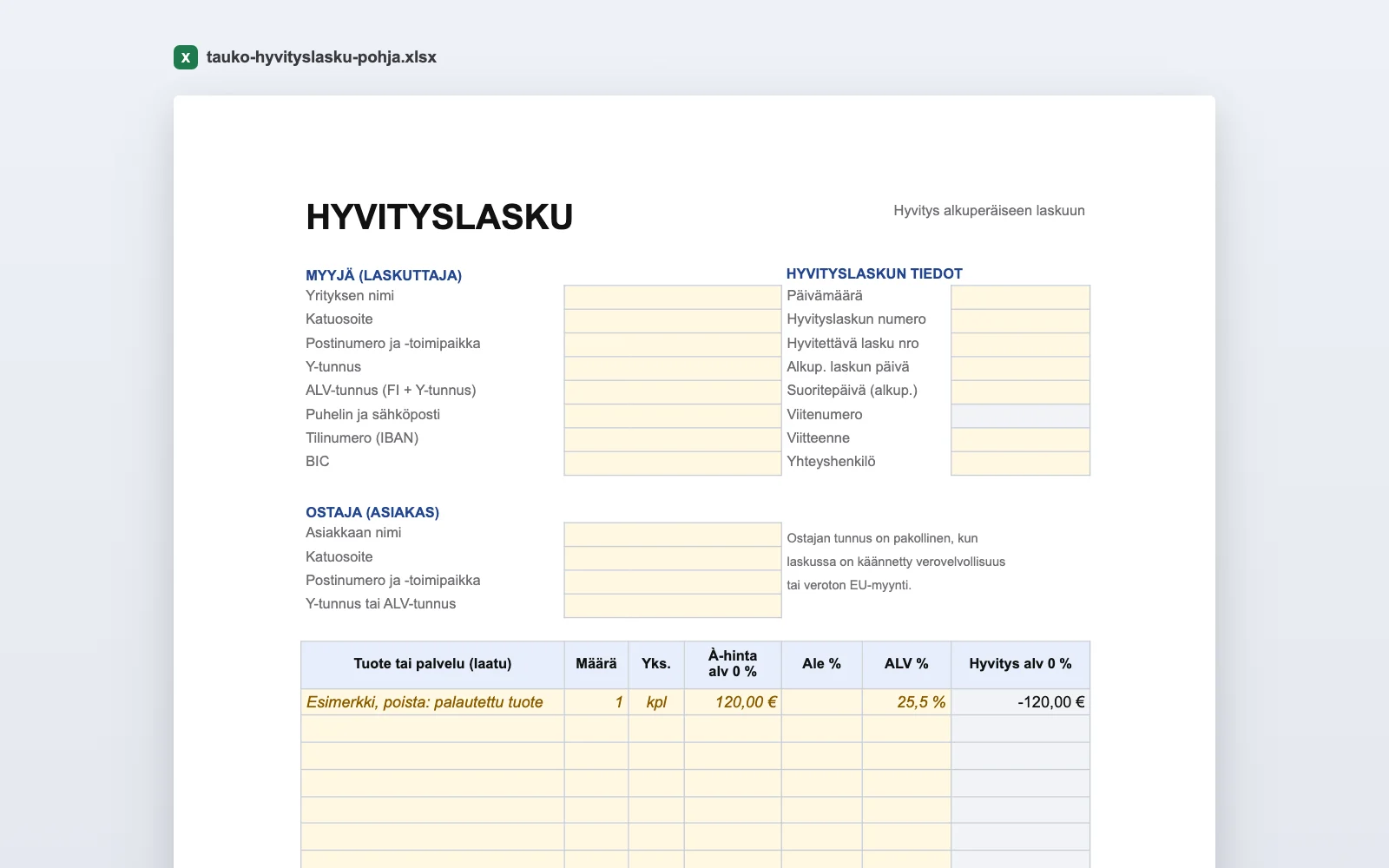
The credit note template is a ready-made model for correcting or cancelling an invoice you have already sent. It has a reference to the original invoice, a field for the reason for the credit and a VAT breakdown by rate. The Excel version turns the amounts negative for you.
Free, no sign-up. A standard .xlsx or .docx file.
The template itself is in Finnish, as used in Finland.
What's in the template
- Fields for the number and date of the invoice being credited
- Seller and buyer details, Business IDs and VAT numbers
- Credit lines: you enter quantity and price as positive figures, and the template makes them negative
- VAT breakdown for the 25.5%, 13.5%, 10% and 0% rates, plus a free rate for crediting old invoices
- Field for the reason for the credit and the payment method
- Word version with the same structure
How to use the template
- 1Find the original invoice
You need its number, date, lines and VAT rates. The credit must match the original invoice so that VAT is corrected properly.
- 2Give the credit note its own number
A credit note takes a number from the same running sequence as your other invoices. The original invoice is not deleted or changed.
- 3Enter the lines being credited
Delete the example line. Enter the quantity and price excluding VAT being credited as positive figures and choose the same VAT rate as on the original invoice.
- 4State the reason and payment method
Write why you are giving the credit, for example a returned product or a wrong price, and whether the credit is paid to the customer's account or deducted from the next invoice.
- 5Send and record
Save as PDF and send to the customer. In the books, the credit reduces sales and output VAT in the period in which the credit is given.
When do you need a credit note?
A credit note is always made when an invoice you have sent needs to be reduced or cancelled entirely. Common reasons are a returned product, a wrong price or quantity, work invoiced twice and a discount given afterwards. An invoice that has been sent must not be edited or deleted, because invoice numbers must form an unbroken sequence.
If the invoice is completely wrong, for example it went to the wrong customer, make a credit note for the full amount and then a new, correct invoice. That way the books show afterwards what happened.
An email promising the customer a discount is not enough. Without a credit note, sales and VAT stay in the books at the amount of the original invoice, and you pay VAT on money you never received.
What must a credit note contain?
Under the Finnish VAT Act, a document that changes the original invoice and refers to it specifically is treated as an invoice. A credit note must therefore have the same basic details as an invoice, plus the number and date of the original invoice.
The amounts are negative, and VAT is credited at the same rate at which the sale was originally invoiced. If the original invoice had several VAT rates, credit each one at its own rate. The template's VAT breakdown does this for you.
The reason for the credit is not listed in law as a required entry, but always write it down. A year later nobody remembers why €150 was credited, and the auditor or tax inspector will ask about it first.
Most common mistakes in credit notes
The most common mistake is the wrong VAT rate. If you sold the goods before September 2024, when the standard rate was 24%, the credit is made at 24%, not at the current 25.5%. You can enter an old rate like this on the bottom line of the template's VAT breakdown.
Another mistake is deleting the original invoice and making a new one in its place. That leaves a gap in the number sequence, and the figures in the VAT return don't match the invoices. A third mistake is forgetting the credit in the VAT return. The credit is deducted from the sales of the month in which it is given.
A fourth mistake concerns discounts given afterwards. If you credit, for example, a whole year's purchases, the credit note must still show which invoices or period the credit relates to.
Example: partial credit
You sold a customer three products at €120 each with 25.5% VAT, €451.80 in total. The customer returns one. The credit note gets one line: quantity 1, price €120, VAT 25.5%. The template shows a credit of -€120.00 excluding VAT, -€30.60 VAT and -€150.60 in total.
If the customer has already paid the original invoice, you refund €150.60. If the invoice hasn't been paid, the customer pays the difference, €301.20, and both invoices are settled with the same payment.
Credit notes in the books
A credit note is recorded like a sales invoice, but as a negative: sales and output VAT go down. If the customer has already paid, you owe the customer, and the money paid back is recorded as payment of that debt.
If you aren't sure whether to credit the whole invoice or part of it, you can ask your accountant at Tauko. The question doesn't cost extra.
Frequently asked questions
What is a credit note?+
A credit note reduces or cancels an invoice sent earlier. It has negative amounts and a reference to the original invoice.
Can you just delete an invoice you have sent?+
No. An invoice that has been sent is a bookkeeping document, and the number sequence must not have gaps. The error is corrected with a credit note and, if needed, a new invoice.
Does a credit note need its own number?+
Yes. A credit note is numbered in the same running sequence as other invoices, and it states the number of the invoice being credited.
Which VAT rate is used for the credit?+
The same rate as the original sale. If the sale was made at the 24% rate, the credit is also made at 24%, even though the standard rate is now 25.5%.
Which VAT return does the credit belong to?+
The credit is deducted from the sales of the period in which the credit is given. The VAT return for the original period is not corrected because of the credit.
Does the credit have to be paid to the customer straight away?+
If the customer has already paid, the credit is refunded to their account or deducted from the next invoice, as you agree. Write the chosen method on the credit note so that neither of you is left unsure.