Single-entry bookkeeping template: free bookkeeping Excel for sole traders
A single-entry bookkeeping template is a spreadsheet where a sole trader records income and expenses by payment date, document by document. The Finnish Accounting Act does not prescribe a form or software, as long as entries are based on documents and kept in chronological order. This free Excel template separates VAT for you, calculates the VAT return figures for each month and the year's result for your tax return.
Free, no sign-up. A standard .xlsx or .docx file.
The template itself is in Finnish, as used in Finland.
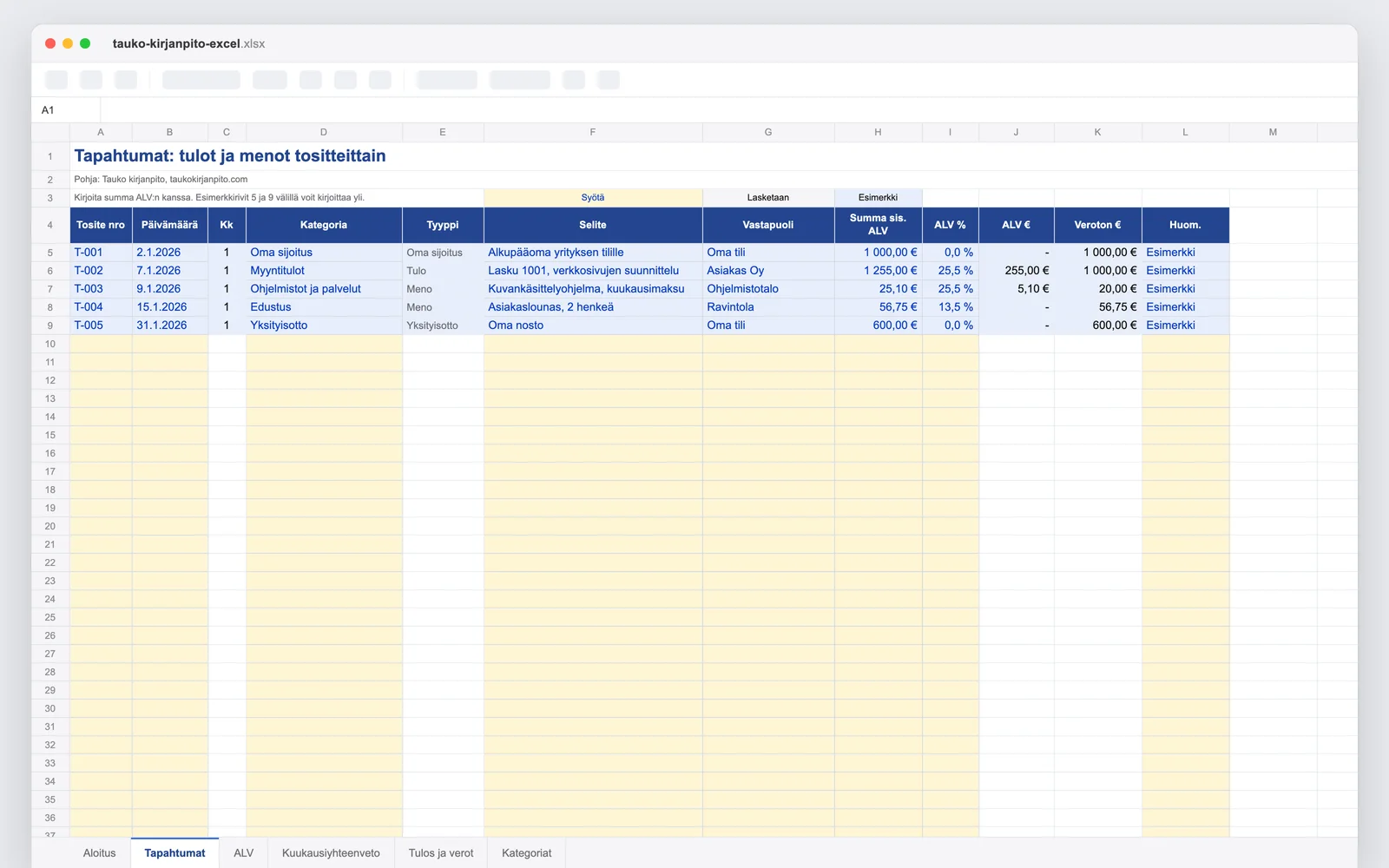
What's in the template
- Transactions tab for 500 rows: document number, date, category, description, amount and VAT rate. A document number used twice turns red
- VAT breakdown by month and by quarter: output VAT at the 25.5, 13.5 and 10 percent rates, deductible input VAT and the amount payable
- Monthly summary showing each category month by month and the cumulative result for the year to date
- Annual result and tax worksheet: depreciation, entertainment expense adjustment, 5% entrepreneur deduction and the split into capital and earned income
- Cash reconciliation against your bank balance, so a missing receipt turns up straight away and not next spring
- 23 ready-made categories you can edit, and five example rows that show the right format
How to use the template
- 1Fill in the Start tab
Enter the company name, the year and the account balance on 1 January, and choose whether you are in the VAT register. You type in the yellow cells; the grey cells are calculated for you.
- 2Number your documents
Give every receipt and invoice a running number, for example T-001, and write the same number in the file name or on the paper receipt. The number links the entry to the document.
- 3Record the transactions
Enter the amount as shown on the receipt, including VAT, and choose the VAT rate and category from the list. The template calculates the VAT and the net amount.
- 4Check at the end of the month
See the VAT payable for the month on the VAT tab and reconcile the cash on the Result and taxes tab. The difference should be zero.
- 5Transfer the figures to your tax return
At the end of the year the worksheet shows your business result and how it is split. Add depreciation, mileage allowances and the home office deduction, and transfer the figures to OmaVero.
What do you need in a single-entry bookkeeping template?
For single-entry bookkeeping you need numbered documents, income and expenses by payment date, a VAT breakdown and an annual summary. This free template gives you all of these. You enter the amount on the receipt and choose a category, and the template separates the VAT for you. The template works in Excel, Google Sheets and Numbers.
The basic columns of the spreadsheet are the date (the payment date, when money came in or went out), the document number (the running number of the receipt or invoice), a description, a category, the amount including VAT and the VAT rate. From these, the VAT and the net amount are calculated. A monthly VAT breakdown and an annual summary bring the figures together. All of these are ready on the template's Transactions tab.
In 2026 the VAT rates are 25.5%, 13.5% and 10% (newspapers and magazines only). Some search engine answers and old templates still use the 14 percent rate. According to the Finnish Tax Administration, it was replaced by the 13.5 percent rate on 1 January 2026, so check the rate if you use an old template.
What does single-entry bookkeeping mean, and when is it enough?
In single-entry bookkeeping every transaction is recorded once: income as income and expenses as expenses. In double-entry bookkeeping the same transaction is recorded in two accounts, as a debit and a credit, which produces a balance sheet. When people search for simple or double bookkeeping, these are usually what they mean. The differences are explained in the article single-entry bookkeeping.
A sole trader may keep single-entry books when no more than one of these limits is exceeded in two consecutive financial years: turnover €200,000, balance sheet total €100,000 or an average of three employees. A limited company always keeps double-entry books, so this template is made for sole traders and self-employed professionals.
A sole trader running a trading business, such as a shop or a construction business, must adjust the result to the accrual basis for taxation. Trade receivables, trade payables and inventory at year end are included in the worksheet, and the template has a separate row for this.
Example: a month's entries in the template
A worked example for a VAT-registered sole trader. Six documents are recorded in March, and each amount is entered as it appears on the receipt or invoice:
T-001 3 March sales invoice €1,255.00, category Sales income, VAT 25.5%. T-002 5 March software €25.10, Software and services, 25.5%. T-003 10 March supplies €627.50, Goods and materials, 25.5%. T-004 15 March phone bill €37.65, Phone and internet, 25.5%. T-005 20 March transfer to own account €600.00, Private withdrawal. T-006 31 March account monthly fee €8.00, Bank and payment services, 0%.
The template separates the VAT on every row. Net sales are €1,000 and net expenses 20 + 500 + 30 + 8 = €558, so the March result is €442. Output VAT is €255 and deductible input VAT 5.10 + 127.50 + 7.65 = €140.25, so €114.75 is payable on the VAT return. The private withdrawal does not change the result, but it reduces the account balance. That is why it is recorded, so that the cash matches the bank account.
Categories: a simple chart of accounts for sole traders
Single-entry bookkeeping does not need a numbered chart of accounts. Still, group your expenses the same way the tax return asks for them. The template has 23 ready-made categories: for income, Sales income and Other income; for expenses, among others Goods and materials, Subcontracting, Premises rent, Small purchases, Phone and internet, Software and services, Marketing, Travel expenses, Car expenses, Insurance, YEL contributions, Bookkeeping and experts, and Entertainment.
Four categories do not affect the result: Machinery and equipment (purchases over €1,200 with a useful life of more than 3 years, which are depreciated), VAT payment or refund, Owner's contribution and Private withdrawal. Each category knows whether its VAT is deductible, so for example the VAT on entertainment is automatically left undeducted. You can rename the categories or add your own, as long as you choose a type for them from the list.
How the template prevents the most common mistakes
The most common mistake is to record the full receipt amount as an expense and then deduct the same VAT again on the VAT return. The template separates the VAT for you, and the expense always appears net of VAT in the income statement. For entertainment expenses, VAT cannot be deducted at all, and only half of the expense is deductible in income taxation. The Entertainment category handles both.
The second mistake is putting private withdrawals among expenses. When you pay for your own shopping or your prepaid tax from the business account, it is not an expense. In the template these go to their own category, so they do not reduce the result but the cash reconciliation stays correct.
The third mistake is expensing a machine in one go even though the price exceeds the €1,200 small purchase limit and its useful life is more than three years. In that case the purchase is depreciated on the reducing balance at up to 25 percent a year. The Machinery and equipment category takes the purchase to the depreciation calculation, and the depreciation calculator shows how the depreciation builds up over the years.
According to the Finnish Tax Administration's guidance, the rules are as follows: a purchase with an estimated useful life of no more than 3 years can be deducted in one go regardless of price. A small purchase of up to €1,200 can be deducted in one go, but small purchases may total no more than €3,600 a year. When the undepreciated balance of machinery is €1,200 or less, it can be written off in one go. So record, for example, a €900 computer in the Small purchases category and a €4,000 excavator attachment in the Machinery and equipment category.
What does the Finnish Accounting Act require of Excel bookkeeping?
The law does not forbid spreadsheets. However, entries must be based on a document and kept in chronological order so that you can get from every entry to its document and from every document to its entry. That is why the template has a running document number, and why the same number is written on the receipt.
Documents are kept for at least six years, and the books and financial statements for ten years. An electronic archive is fine, as long as the files are kept safe and readable. For a small business, one folder per year with file names by document number is enough. More practical tips are in the article bookkeeping with Excel.
How often are entries made and the VAT return filed?
Under the Finnish Accounting Act, cash payments are recorded daily and other transactions can be recorded monthly, as long as the VAT return can be made from up-to-date books. For most sole traders it is enough to fill in the template once a week and check it at the end of the month.
The VAT return is filed for each VAT period. The default is a month. If your turnover is no more than €100,000 a year, you can choose a quarter, and with turnover of no more than €30,000, a calendar year. That is why the template's VAT tab calculates both months and quarters. VAT registration is compulsory when turnover exceeds €20,000 in a calendar year. If your sales stay below that, choose No on the Start tab, and the template will not separate VAT. VAT rates and filing are explained in the article VAT return.
The tax return is filed once a year in OmaVero with the business tax return (form 5). According to the Finnish Tax Administration's instructions, income and expenses are reported excluding VAT, and the template's Result and taxes tab gives them in exactly this form. Line-by-line instructions are in the article tax return for self-employed professionals.
Can you do your own bookkeeping in Excel?
Yes. A sole trader may do their own bookkeeping, and the law does not require an accountant or paid software. Doing it yourself works well when you have a few dozen documents a month, your sales are domestic and you record receipts at least once a week.
When you do it yourself, the responsibility is entirely yours: a forgotten VAT return, a wrong VAT rate or a missed deduction only shows up in taxation. So work out your own hourly rate and compare it with what bookkeeping for a sole trader costs at an accounting firm. At Tauko, bookkeeping for a sole trader starts at €69/month and for a limited company at €89/month (excl. VAT), and the financial statements and tax return are billed separately.
A worked example: if you record 10–20 documents a month, filling in the template, checking VAT and doing the annual tax return easily takes 2 hours a month, or about 24 hours a year. In Tauko's price survey (public price lists of 18 accounting firms, 11 October 2026), the median monthly bookkeeping price for a sole trader with about 10 documents a month was €75/month, and the annual price including separately billed financial statements was €1,069 (excl. VAT). If an hour of your time is worth more than about €45 in billing, outsourcing already pays off on paper. See your own price based on your number of documents, or if you already have an accounting firm, get a quote to compare with your current firm.
How do you do double-entry bookkeeping in Excel?
In double-entry bookkeeping every transaction is recorded in two accounts, as a debit and a credit, and the entries must be shown both in chronological order (the journal) and by account (the general ledger). In Excel this means a list of accounts, an entry row for every posting and a pivot table that builds the general ledger, the income statement and the balance sheet.
It can be done, but finding errors is laborious, and a limited company's financial statements also require balance sheet specifications and notes. This template is made for single-entry bookkeeping. If you need double-entry bookkeeping, first read double-entry bookkeeping and consider bookkeeping software instead of Excel.
When is Excel no longer enough?
Excel works well when you have a few dozen documents a month, you sell in Finland and you have no employees. You reach the limit when you sell to other EU countries, work in construction with reverse-charge VAT, pay salaries or don't have time to record receipts every week. Then bookkeeping moves to your evenings, and errors only turn up when you do your tax return.
At this point it makes sense to hand the bookkeeping over to an accountant. At Tauko an accountant checks a sole trader's books every month, and questions and advice are included in the fixed monthly price. Financial statements are billed separately. You can see the price on the pricing page before you commit to anything.
Frequently asked questions
What must single-entry bookkeeping include?+
An entry for every item of income and expense, based on a document: date, document number, amount, what it is for and the other party. If you are in the VAT register, you also need a monthly VAT breakdown. For the tax return you need an annual summary. The template has all of these.
Is Excel bookkeeping legal?+
Yes. The Finnish Accounting Act does not prescribe any software. Entries must be based on documents, in chronological order and traceable, and the material must be kept. The template's running document number takes care of traceability.
Who may keep single-entry books?+
Sole traders and self-employed professionals, when no more than one limit is exceeded in two consecutive years: turnover €200,000, balance sheet €100,000 or three employees. Limited companies, general partnerships and limited partnerships keep double-entry books.
Does the template work in Google Sheets and Numbers?+
Yes. The template only uses common functions such as SUMIFS, INDEX and MATCH. Open the file via Google Drive or in Numbers and the drop-downs and formulas will work.
Is the amount recorded including or excluding VAT?+
Enter the amount as it is on the receipt or invoice, that is including VAT, and choose the VAT rate. The template calculates the VAT portion and the net amount. If you are not in the VAT register, choose No on the Start tab, and the whole amount counts as income or expense.
Where can I get a single-entry bookkeeping Excel template?+
Right here: the Download Excel button gives you a free xlsx template with Start, Transactions, VAT, Monthly summary, Result and taxes, and Categories tabs. The template works in Excel, Google Sheets and Numbers without registering.
Where do I record private withdrawals and money I put into the business?+
In their own categories, Private withdrawal and Owner's contribution. They are neither income nor expenses, so they do not affect the result, but without them the cash balance will not match the bank account.
What is a free bookkeeping program for Excel?+
Excel itself is not bookkeeping software, but this template does the same as a simple program: recording documents, the VAT breakdown and the income statement. The template is free and needs no registration. Free software options and their limits are in the article free bookkeeping software.
How much does bookkeeping for a limited company cost?+
A limited company's bookkeeping is double-entry, so this template is not suitable for it. At an accounting firm, a limited company pays for the financial statements on top of the monthly price. At Tauko, bookkeeping for a limited company starts at €89/month (excl. VAT). You can see market price levels on the page bookkeeping prices.
How do I get the figures for the tax return?+
The Result and taxes tab calculates the business result, the entrepreneur deduction and the split into capital and earned income. A sole trader's tax return is filed in OmaVero with the business tax return (form 5), and income and expenses are reported excluding VAT. The calculation is an aid, so check the figures before you submit.
Can a purchase under €1,200 always be expensed directly?+
According to the Finnish Tax Administration's guidance, small purchases of up to €1,200 can be deducted in one go, but no more than €3,600 in total a year. If a purchase has a useful life of no more than 3 years, it can be deducted in one go regardless of price. Other purchases are depreciated at up to 25% a year.
How do I do single-entry bookkeeping in Excel?+
Download the template or make a spreadsheet with the columns date, document number, description, category, amount and VAT rate. Record every receipt and invoice by payment date and number the documents consecutively. At the end of the month, calculate the VAT return figures and reconcile the balance with your bank account.
Is there an official template for single-entry bookkeeping?+
No. The Finnish Accounting Act does not prescribe a form, software or spreadsheet layout. Entries must be based on documents, in chronological order and traceable, and the material is kept for the period required by law.
Do you have to do single-entry bookkeeping every month?+
Cash payments are recorded daily and other transactions monthly, so that the VAT return can be made from up-to-date books. Entries must always be in chronological order and based on documents.